Tutorial: “Clockwork” Effect in Powerpoint
Tutorial: “Clockwork” Effect in Powerpoint
Posted by on Mar 26, 2013 in Multimedia |

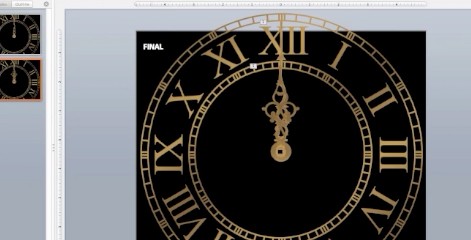
Download Link This podcast was quite the multimedia adventure.  I edited the clock face from a stock vector (Clock Vector by Fatalyze at deviantArt) in Photoshop, then live traced it in Illustrator.  I also created the clock hands in Illustrator.  I imported both into Microsoft Powerpoint, where I created the clockwork effect as described in this tutorial.  I used Quicktime to record the screen capture and my voice, then imported the video into iMovie, where I had to tweak the audio controls to bring out my voice.  Next, I created the music in GarageBand.  I used a lot of rubber-banding to control the volumes of the different lines of music. I made all of the static images in Photoshop.  I kept them simple because I wanted them to reflect the design of my website, which is quite minimalist.  I deliberately chose a sans serif font that would contrast with my busy logo. One objective of this assignment was to keep the podcast under 5mb, which limited the amount of video I could implement without really sacrificing quality.  It’s still too fuzzy for my tastes unless it’s kept to a minimal size, but its small file size allows for easy downloading or streaming, which is important for simple tutorial videos like these.  My target audience for this podcast is people like me, who enjoy trying new things and learning on their own, but don’t want to wait for a huge file to...

Read More

Handi-Snacks Product Redesign

Handi-Snacks Product Redesign

Posted by on Mar 7, 2013 in Graphics |

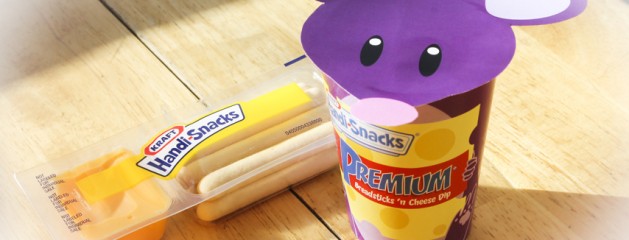
Handi-Snacks Product Redesign   For my Advanced Visual Media class, we were challenged to take an outdated or “ugly” package and redesign it.  While I don’t think the Handi-Snacks Breadsticks n’ Cheese Package is hideous, I was intrigued by the possibility of creating a cup-like package instead of the plastic cartridge.  I was inspired by Yan-Yan, a similar Japanese snack.  This project really challenged my knowledge of Illustrator and InDesign, but I’m glad to say that I learned and accomplished a lot.  I particularly learned a lot about working with vectors and shapes instead of using freehand drawing, which is my preferred design method. To create the package, I took apart a Yan-Yan package and scanned it into Illustrator so I could trace its rough shape.  Working with a tapered cylinder was the most difficult aspect of this project.  All of the graphics I created had to be tapered on the bottom to follow the shape of the package.  I used an online tool to generate the Nutritional Facts panel and WhattheFont.com to figure out which fonts to use.  I was able to download the Hand-Snacks logo from the internet, then live traced it in Illustrator to make a version I could edit.  I made the barcode simple by using a barcode font from dafont.com.  All of the other elements of the package I made using the shape tool and pen tool, including the mouse lid.  I printed the lid on 100lb glossy cardstock and the label on sticker paper, and I constructed the package using pieces from the dismantled Yan-Yan package and lots of glue. As part of the assignment, I also created a product design booklet to use in my “pitch” to Handi-Snacks.  I used InDesign for most of the layout and content.  A notable exceptions are the product packaging itself (made in illustrator, as mentioned above), the product photo (shot by me and edited in Camera Raw), and the print advertisement, which I created in Photoshop using a photo I took myself of my cousin and her son.  I used the quick selection tool to cut them out of the original photo and replaced the background with a a cartoon background vector (Kitchen Background by ~kellistrator at deviantArt.com; used with permission).  To add an extra touch of whimsy, I used the brush tool and doodled onto the...

Read More

Large Print

Posted by on Mar 2, 2013 in Blog, Photography |

This is yet another variation on my light painting.  This one will be printed at 20 x 30 and framed to hang in the Spori. My rommate Brit and I made this using a small pocket light. I first focused the camera with the lights on, then, still holding the focus, turned off the light and pushed all the way on the trigger to take the shot.  During the six minutes that my shutter remained open, Brit used the pocket light to briefly splash the mask, candy dish, lantern and the candle with light. Behind the lantern you can see a light trail left by the brief moment her light shined directly into the camera lens.  As you can tell from my earlier posts, I have several variations of this scene, because each time we shot the lighting and colors turned out very differently.  I ultimately decided to print this one because I think the focus in this image is better than that of the others, and I love the shade of purple on the candle in the back and hints of blue in the lantern. I used the lasso tool and content aware fill to remove a label from then lantern, boosted the vibrancy, and added a dark vignette in Camera Raw to soften the edges and keep the eye from wandering off the edge of the image. Original:...

Read More

Borders

Posted by on Feb 27, 2013 in Blog, Photography |

I learned this neat border trick from Caryn Esplin’s book, Custom Images. To get this effect, I set a black mask over the image and a white layer behind, then I used white on an assortment of thick, heavy brushes to “paint” the image back in, leaving the white background layer to show through as a border.  I really like the effect that the lowered opacity on the brushes gave me.  I’ll definitely be using this again. This is the original image:     This is another neat border technique, and a relatively simple one at that.  I just duplicated the layer, set it to multiply, and then used the rectangular marquee tool to delete the center, leaving behind the darkened edge.  I then applied a 10px stroke in a light lavender color and duplicated the multiply layer to darken the border even more.  It ended up being too much so I scaled down the opacity on the second multiply layer.  And, voila!  This isn’t one of my favorite images, but I think the border helped salvage it, along with several other edits made in camera raw.  The original is below:       This border effect was more complicated than the others, only because I’ve never used the rectangle tool.  I started by cropping it and then adding to the canvas to get the white border.  Then I added a white rectangle using the rectangle tool, and masked out part of it using a black rectangle tool.  I applied a motion blur to the inner border and lowered the opacity of the layer to soften the border. The original:     This is a really elegant framing technique Caryn Esplin learned from Scott Kelby and shared with the class.  I created the template by using the rectangle tool to create black “windows,” and then I posted the photo over the template and converted it into a clipping mask.  I finished it off by adding my logo on the bottom. The image is a variation of the light painting I posted...

Read More

Night and Light

Posted by on Feb 27, 2013 in Blog, Photography |

This is a light sketch!  I set my shutter speed to 6 seconds with a two second timer.  I had to turn the lights on to get the camera to focus, take the shot, and then quickly turn off the lights and starts rapidly “drawing” in the air with a small LED flashlight as soon as I heard the shutter click.  I was trying to draw Navi for The Legend of Zelda so I deliberately was trying to draw wings and ended up with this. I wish I’d had a flashlight with more focused light so I didn’t have to point it right at the camera to get light trails, bu ah well.  As it was, I had to go to six neighboring apartments looking for flashlights and AAA batteries.  I used the clone stamp tool in Photoshop Elements to remove the speck of sensor dust from the image.   I recruited my roommate Brit to help set up and light this scene.  Most of the beautiful things in this image belong to her. It took several shots to decide where we wanted the light.  I sat by the table manning the camera, while she turned of the light and used a tiny pocket light to illuminate the scene. the greenish light on the mask was caused by Brit shining the light through the glass candy dish on the left.  I used a very subtle Gaussian blur in Photoshop elements to soften the whole image, and added a shadow vignette to add more mystery to the photo.   If I didn’t know any better, I’d look at this image and think it was made in Photoshop simply by dragging a white brush over a black canvas–but it’s actually a camera motion shot!  I pointed my camera at the moon, took the shot, and used my 2.5 second window of time to “draw” the shape by rapidly moving the camera.  For reasons I don’t quite understand, I had to “draw” the heart shape upside-down in order to get it to appear right-side up in the image.  It took a lot of trial and error to figure that out.  It still amazes me that the light looks so crisp!  For editing I merely cropped it in...

Read More

Bannack Best

Posted by on Feb 20, 2013 in Blog | 1 comment

I loved the dramatic shadows on this shot.  I bumped up the saturation and lowered the exposure in camera raw, and then I experimented with the “cappuccino” setting in a sepia toning action made by ~paranoidstock on deviantart.com.  It turned out far too dark, so I manipulated the hue and saturation levels and turned off one of the adjustment layers to get the effect you see here.   This is an organ in the doctor’s house.  When I think of organs I think of the massive one in the Salt Lake City Conference Center, so this was particularly interesting to me.  The doctor that once owned this old house must have been a music lover, because his home hosted not only an organ but a piano as well.   This might be my favorite shot of the whole trip.  I used camera raw to lower the saturation and add a shadowy vignette.   This gavel and top hat were laying on a table near a window in the Masonic Temple.  The park ranger told us that the identification numbers used for this sect of the Free Masons was used to denote vigilantes.  Law and Order, wild west style.   I snapped this shot while the model was posing for another photographer.  I liked her wistful gaze. I used Camera Raw to reduce the saturation.   The detail on the window of this church was the first thing that really caught my eye when I entered Bannack.  I got this photo of it as we were leaving for the day.  I used camera raw to deepen the shadows, blacks, and whites, and added a vignette to get more...

Read More

Bannack HDR

Posted by on Feb 20, 2013 in Blog |

I shot this image using my camera’s bracketing settings, which captured the image at three different exposures.  I used Photomatix to compress them all together.  The result: I decided to go for a more realistic approach when choosing the settings for my HDR, rather than the surrealistic style that seems to be pretty popular.  I just wish I’d thought to use a gold reflector to get just a little rim lighting on the right edge of the bottle.   I took this picture near the very beginning of the visit, when I was still trying to figure out which camera settings to use.  I originally saw this as a throw-away image because it was so bright, but I thought I’d try to salvage it using a one-shot HDR process.  I used Camera Raw to create two other versions of this image (one far too dark, and one evenly exposed but flat) and then put them all into Photomatix at let it work its magic: The colors are much better! The image is still a little lifeless (get it? Because it’s a Ghost T…nevermind) but it’s a vast improvement over the original!  I added a dark vignette to help frame the...

Read More

Bannack: Macro Abstract

Posted by on Feb 20, 2013 in Blog |

This was the spookiest thing I encountered at Bannack Ghost Town by far.  It appears to be a cross-section of a bone.  It was about five inches across, so it was far too large to be human, but what made it spooky to me was the partial exoskeleton of the bee clinging to the left edge.  It reminded me of the opening sequence of the television show Ghost Whisperer.  Suiting, no?  I should also add I found this in the windowsill of the yellow-door house where several children supposedly died while in quarantine for illness.   I wonder how secure these old door handles were.  I didn’t think to look at the time, but I wonder if you can actually see through the locks, because I read that frequently in books.  That never made sense to me as a child since modern locks certainly cannot be seen through.   This is an experimental Abstract macro.  I blended “Skeletal” with “Locked Away” using the Linear Light blending mode.  The texture of the bone lends an interesting surreal look to the...

Read More

Bannack: Near and Far

Posted by on Feb 20, 2013 in Blog |

At the end of town I found a little green house with a fascinating assortment of objects inside.  The door was locked so I couldn’t go inside, so I aimed my camera at the window and tried to take a shot through.  I noticed as I adjusted my focus that the room inside was completely obscured by the dust on the window pane when I used shallow focus.  I liked the texture of the dust on the glass.  No edits.   This is what the room looked like inside, with a deep focus through the haze of dust on the glass.  There was so many things inside it looked more like a storage shed than a living room.  I like the old typewriter on the shelf on the left, and the set of crutches that can just barely be seen on the...

Read More